Google Ads
How to connect Google Ads to adtribute.
Create Connection in adtribute
Section titled “Create Connection in adtribute”- Open the adtribute App.
- Go to Sources › Connections and click on “Create Connection”.
- Search for “Google Ads” and select it.
- Name the Connection as you like, e.g. the Account Name.
Before going through Connection Process you have to confirm that you have implemented the UTM Parameters that are shown.
Implement UTM Parameter
Section titled “Implement UTM Parameter”{lpurl}?adb_ad_id={creative}&adb_ad_source=google&adb_click_id={gclid}&adb_campaign_id={campaignid}&adb_adgroup_id={adgroupid}&adb_asset_group_id={assetgroupid}&adb_target_id={targetid}&adb_placement={placement}&adb_target={target}&adb_keyword={keyword}&adb_matchtype={matchtype}For Google Ads the UTM Parameter need to be implemented on Account Level:
-
Login to the Ad Account.
-
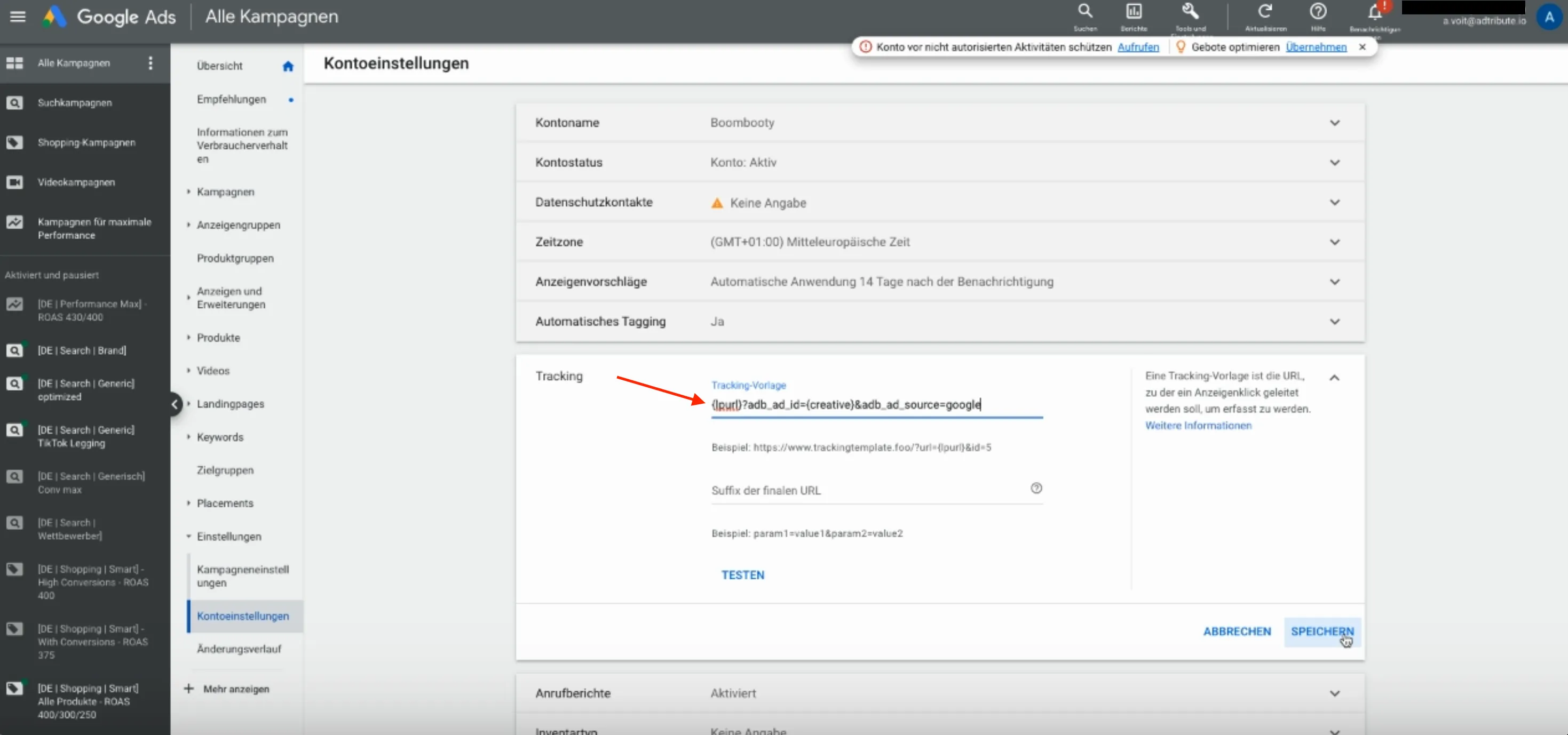
Navigate to “Account Settings” > “Tracking”
-
Implement the copied “UTM Parameter” into the “Tracking Template” field as shown in the screenshot:
Google Ads Connection Flow
Section titled “Google Ads Connection Flow”To start the connection flow simply click “Connect”:
- On the Fivetran page you can click “Continue”.
- Enter either the “Customer ID” or the “MCC ID” into the “Customer ID” field (you can select the Ad Accounts in the next step).
- Click “Authorize with Google”, select your Google Account and confirm.
- Select the relevant Business Manager(s) and click “Continue” > “Save” > “Confirm”.
- Click on the ”+ Accounts” text.
- Select the Ad Accounts you want to connect and click “Apply”.
- Keep the “Historical Sync Time Frame” as it is - adtribute presets it to all time.
- Keep the other settings as they are and click “Save & Test”.
It will validate for a short while and tell you if the Connection was successful.
Complete Connection
Section titled “Complete Connection”After the successful Connection Flow it will redirect you back to the adtribute app and you can find the Google Ads Connection within all of your Connections.
Unsupported Campaign Types
Section titled “Unsupported Campaign Types”The integration of Google Ads “Demand Gen with product feed” campaigns is not yet supported by the Google Ads API. You won’t be able to integrate the costs data from these campaigns through the Google Ads connection.
If you want to integrate Google Ads “Demand Gen with product feed” campaign costs, please add them via a “Custom Channel” connection.