Create Custom Conversions
How to setup custom conversions in adtribute.
Integration
Section titled “Integration”The first step to custom conversions is to make sure the needed data is available.
So, if the conversion you want to look at is based on an event that needs an advanced tracking setup or is not integrated through connections, make sure that you set it up now.
Here are articles that explain different types of custom data integration:
Create Custom Conversion
Section titled “Create Custom Conversion”-
Navigate to Definitions › Events
-
Click Add Event
-
Configure accordingly, e.g.:
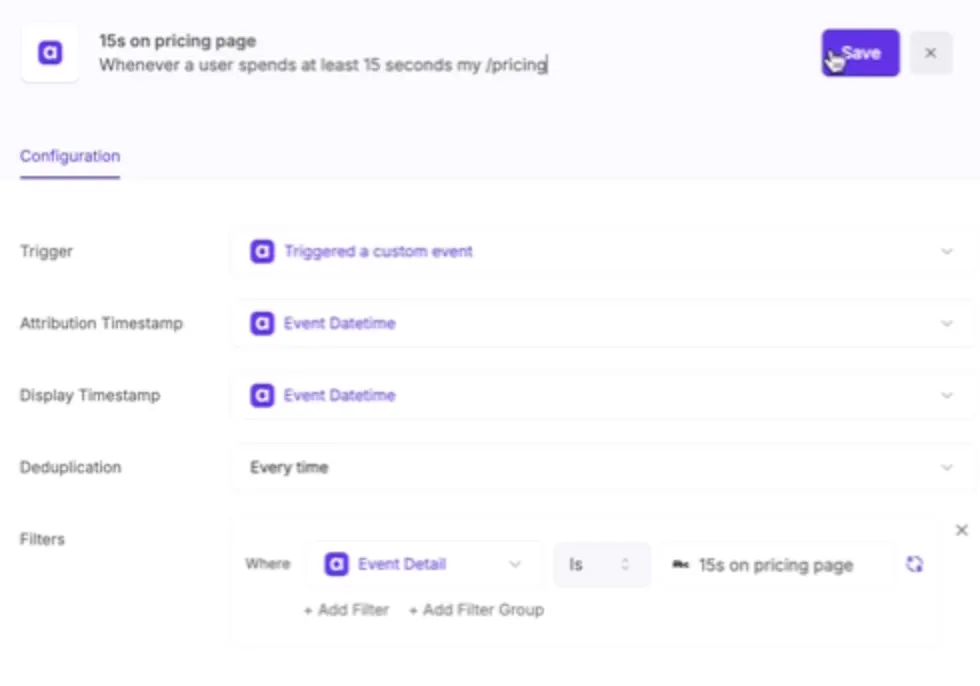
If you need help with that, feel free to reach out to us!
List of common Custom Conversions
Section titled “List of common Custom Conversions”There are a lot of advanced metrics that are specific to your business case which might not be listed here. This list is just to give you an overview what is possible and maybe spark ideas:
- spend 10 seconds on page
- clicked 6 times on page
- started configurator
- halfway configurator
- completed configurator
- started chat
- scrolled 50%
- scrolled 50% + clicked 3 times
- viewed 3+ pages