Members and roles
Invite people and choose what each sees and changes.
| Admin | Editor | Report Viewer | Limited Report Viewer | |
|---|---|---|---|---|
| See boards | All | All | All | Shared with them |
| Edit boards and analyses | ✓ | ✓ | – | – |
| Edit Definitions, Sources and Activation | ✓ | ✓ | – | – |
| Reconnect a source | ✓ | ✓ | – | – |
| Invite people, share boards, open Developer Settings | ✓ | – | – | – |
| Use the MCP | ✓ | ✓ | ✓ | – |
| Use the Chrome extension | ✓ | ✓ | ✓ | ✓ |
| Looker Studio report | Edit | Edit | View | – |
Invite people
Section titled “Invite people”-
Click the gear icon at the bottom of the side navigation, then Members.
-
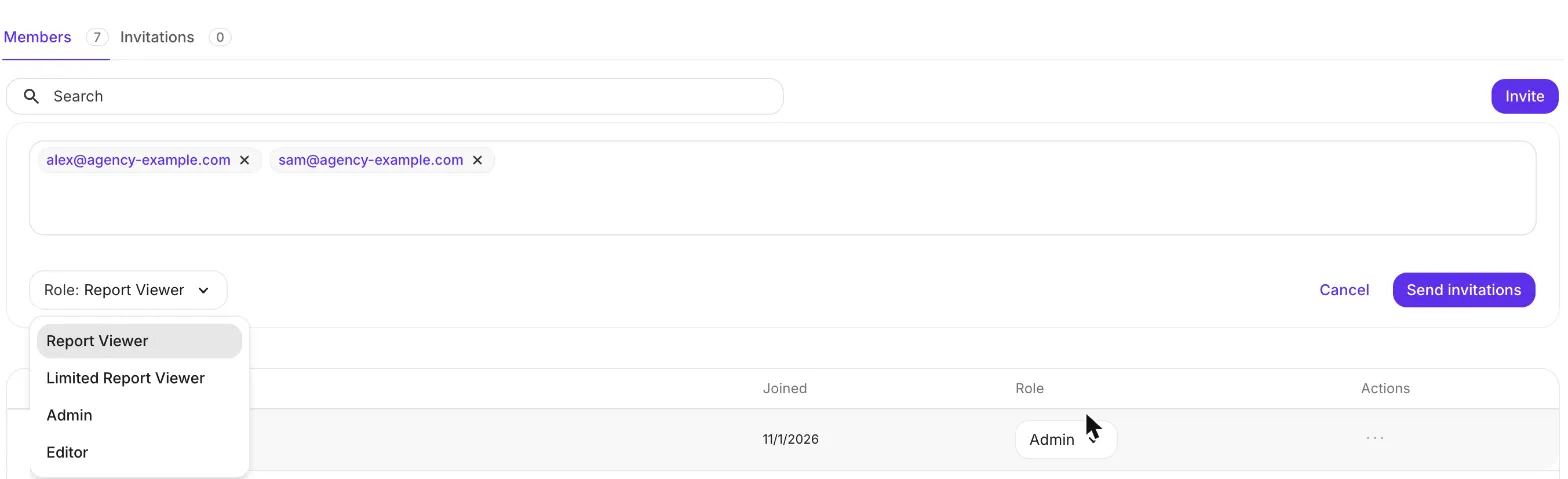
Click Invite.
-
Enter email addresses, separated by commas.
-
Pick a role.
-
Click Send invitations.
Invitees stay under Invitations until they accept. To change a member’s role, use the role menu in their row; to remove them, use ….
Accept an invitation
Section titled “Accept an invitation”No sign-up needed. Click the link in the invitation email (check spam) and sign in with the invited address. Invitations expire after 30 days.
Share a board with an agency
Section titled “Share a board with an agency”Invite the agency as Limited Report Viewers. Once they accept:
- Open the board and click Share.
- Select the people and click Share with ….
They see only this board, limited to its filters.
Several organizations
Section titled “Several organizations”Each organization has its own members and roles. To switch, click the organization name at the top of the side navigation.
I see “You are not part of an organization”. Ask an Admin to invite the address you signed in with.
I can open our Looker Studio report but cannot sign in. Looker Studio access is not an adtribute login. Ask an Admin to invite you.
How do we remove someone’s MCP access? Make them a Limited Report Viewer. Any Admin can change this back.
No one on our team is an Admin. Ask us in Slack or at support@adtribute.io, and we invite your first Admin.