Attribution models in adtribute
See which touchpoints get credit and build your own model.
Standard models
Section titled “Standard models”Your organization has some of these, sometimes under other names such as Non Direct First. By default, all six use the Unlimited window and leave out Direct.
| Model | Credits |
|---|---|
| First Touch | The first touchpoint |
| Last Touch | The last touchpoint |
| Linear | All touchpoints, in equal parts |
| Position Based | First and last touchpoint 40% each, the ones between share 20%. With two touchpoints, 50% each |
| Full Impact | All touchpoints, each in full |
| Channel Impact | The first touchpoint of each channel, each in full |
Email and CRM clicks count like ad clicks. Discount codes from your code list are touchpoints too.
Building blocks
Section titled “Building blocks”Every model combines these four settings, and some also use post-purchase survey answers. To see them, open the model under Definitions › Attribution Models.
Attribution Window
Section titled “Attribution Window”| Window | Touchpoints that count |
|---|---|
| Unlimited | All before the conversion |
| Custom | Those within the Window Duration before the conversion, in calendar days |
| Dynamic | Those after the last gap of more than 7 days between two touchpoints |
Filters
Section titled “Filters”A touchpoint counts if it matches the rules.
Distribution Rules
Section titled “Distribution Rules”Each rule sets a share: 1 is the whole conversion, 0.5 is half. The first matching rule from the top applies. A touchpoint that matches none gets the Default.
| Type | Each matching touchpoint gets |
|---|---|
| Linear Distribution | An equal part of the share |
| Fixed Distribution | The whole share |
| Time Decay Distribution | Part of the share, more for touchpoints closer to the conversion |
| Inverse Time Decay Distribution | Part of the share, more for earlier touchpoints |
Fallback Model
Section titled “Fallback Model”When the window and filters leave no touchpoint, the fallback model credits the conversion, with its own window and filters. If it finds none, its own fallback model goes next.
A filter does not remove conversions: a fallback model can still credit the touchpoints the filter left out.
Why stopped channels keep revenue
Section titled “Why stopped channels keep revenue”Touchpoints stay in the journey, so repeat orders and subscription renewals can credit them long after the channel stopped.
- The Unlimited and Dynamic windows have no age limit.
- With no touchpoint left after the window and filters, the fallback model credits the conversion, and it can credit older touchpoints.
This revenue usually fades as those customers stop ordering. To prefer recent touchpoints, put models with shorter windows ahead of an Unlimited model in the fallback chain.
Direct
Section titled “Direct”Direct is a visit with no referrer, ad or email link. Standard models credit it only when the journey has no other touchpoint.
A conversion with no touchpoint at all shows as No matching Touchpoints found.
Conversion date and click date
Section titled “Conversion date and click date”| Conversion | Click | |
|---|---|---|
| Credit shows on | The day of the conversion | The day of each touchpoint with credit, next to that day’s spend |
| Past days, as customers convert later | Stay the same | Grow |
| Conversions without a touchpoint | Count | Left out |
A Custom window counts back from each conversion, so each click day gets its own window: a click can get credit from conversions up to that many days later.
To switch:
- Board or analysis: In the toolbar, the icon next to the model name shows the date: calendar for conversion, pointer for click. Click it to switch.
- Looker Studio report: Tick Click Date next to the model selection.
Build a model
Section titled “Build a model”You must be an Admin or Editor, and your organization must have fewer than 15 models.
-
In Definitions › Attribution Models, click Add Attribution Model.
-
Enter the Name.
-
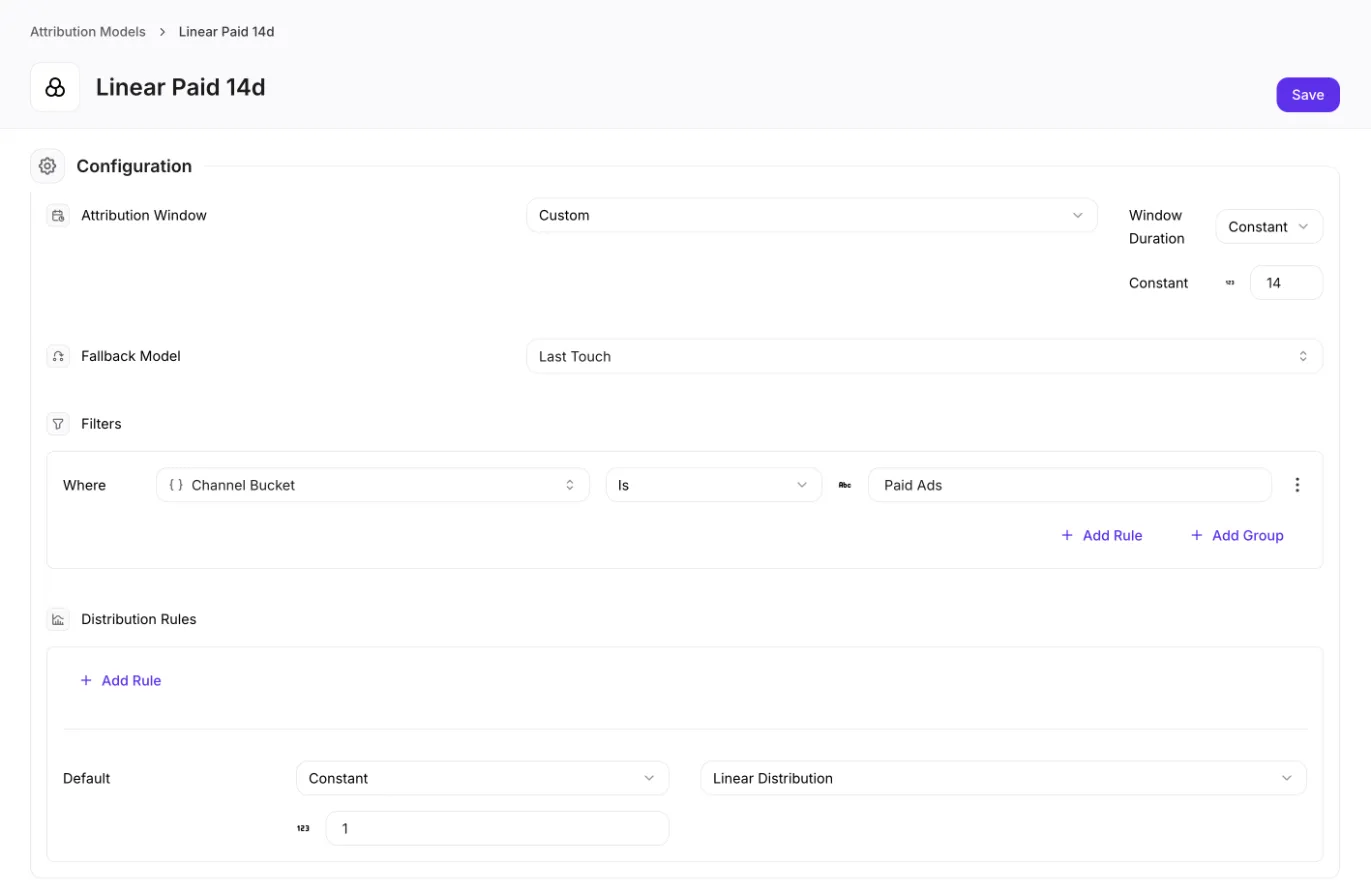
Select the Attribution Window. For Custom, enter the days under Window Duration.
-
Select the Fallback Model.
-
Optional: Under Filters, click Add Rule. Select the attribute and operator, select Constant and enter the value.
-
Under Distribution Rules, next to Default, select Constant, enter the share and select the type.
-
Optional: Click Add Rule to give some touchpoints another share.
-
Click Save.
To copy a model, open it and click ⋮, then Duplicate.
You can select the model in boards and analyses right away. Its numbers, with all past days, arrive the next morning. For a Looker Studio report, ask us to add it.
Change a model
Section titled “Change a model”Open it, change it and click Save. The next morning, all past days follow the new settings. To keep the old numbers, change a duplicate.
What is the difference between First Touch and Paid Dynamic First Touch? It credits the first paid click in the Dynamic window, not the first touchpoint of the whole journey. With no such click, its fallback model decides.
Why do Direct conversions have a high new customer share? Returning customers usually have an earlier touchpoint that takes the credit, so first orders often stay with Direct.
Why do conversion counts show decimals? A model that splits a conversion gives each touchpoint a part.
A channel shows more conversions in the journey report than in my model. The journey report counts every journey the channel touched. The model counts only the channel’s share.
Can I use a different model for each channel? Yes, but the same conversion can then count in several channels.
Does a campaign get everything its customers buy later? Not always. A later touchpoint can take the next order.
Why does an existing customer’s journey start with email? Website touchpoints count from the day tracking started, so their first tracked click can be an email.